Navigation3
Introducció
Navigation describes the way users move around your app. Users interact with UI elements, usually by tapping or clicking on them, and the app responds by displaying new content. If the user wants to go back to the previous content, they use the back gesture or tap the back button.
Modeling navigation state
A convenient way of modeling this behavior is with a stack of content. As the user navigates forward to new content, it is pushed on top of the stack. When they go back from that content, it is popped off the stack and the previous content is displayed. In navigation terms, this stack is usually referred to as the back stack because it represents the content that the user can go back to.
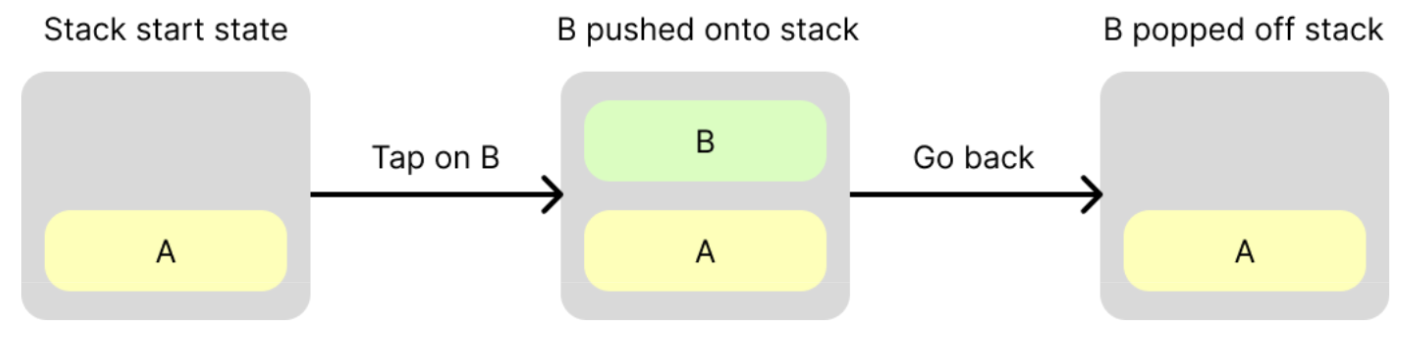
Create a back stack
The back stack does not actually contain content. Instead, it contains references to content, known as keys. Keys can be any type but are usually simple, serializable data classes.
A key concept is that you own the back stack. The library:
-
Expects that your back stack will be a snapshot-state backed
List<T>, whereTis the type of your back stack keys. You can useAnyor you can provide your own, more strongly-typed keys. When you see the terms “push” or “pop”, the underlying implementation is to add or remove items from the end of a list. -
Observes your back stack and reflects its state in the UI using a
NavDisplay.
The following example shows how to create keys and a back stack, and modify the back stack in response to user navigation events:
// Define keys that will identify content
data object ProductList
data class ProductDetail(val id: String)

@Composable
fun MyApp() {

    // Create a back stack, specifying the key the app should start with
    val backStack = remember { mutableStateListOf<Any>(ProductList) }

    // Supply your back stack to a NavDisplay so it can reflect changes in the UI
    // ...more on this below...

    // Push a key onto the back stack (navigate forward), the navigation library will reflect the change in state
    backStack.add(ProductDetail(id = "ABC"))

    // Pop a key off the back stack (navigate back), the navigation library will reflect the change in state
    backStack.removeLastOrNull()
}