Group
You can groups rows with the same value into one group or bucket.
group by
If you want to organize your data in groups and calculate some kind of aggregate statistics for these groups, the GROUP BY clause is what you need.
%20rotate(0.00)%22%3E%3Cpolygon%20points=%220,0%20-10.40,6.24%20-10.40,-6.24%22%20fill=%22%2364748B%22%20stroke=%22%2364748B%22%20stroke-width=%222%22%20stroke-linejoin=%22round%22%20stroke-linecap=%22round%22/%3E%3C/g%3E%3Cg%20transform=%22translate(187.14%2026.00)%20rotate(0.00)%22%3E%3Cpolygon%20points=%220,0%20-10.40,6.24%20-10.40,-6.24%22%20fill=%22%2364748B%22%20stroke=%22%2364748B%22%20stroke-width=%222%22%20stroke-linejoin=%22round%22%20stroke-linecap=%22round%22/%3E%3C/g%3E%3Cg%20transform=%22translate(303.34%2026.00)%20rotate(0.00)%22%3E%3Cpolygon%20points=%220,0%20-10.40,6.24%20-10.40,-6.24%22%20fill=%22%2364748B%22%20stroke=%22%2364748B%22%20stroke-width=%222%22%20stroke-linejoin=%22round%22%20stroke-linecap=%22round%22/%3E%3C/g%3E%3Cg%20transform=%22translate(403.86%2026.00)%20rotate(0.00)%22%3E%3Cpolygon%20points=%220,0%20-10.40,6.24%20-10.40,-6.24%22%20fill=%22%2364748B%22%20stroke=%22%2364748B%22%20stroke-width=%222%22%20stroke-linejoin=%22round%22%20stroke-linecap=%22round%22/%3E%3C/g%3E%3C/svg%3E)
%20rotate(0.00)%22%3E%3Cpolygon%20points=%220,0%20-10.40,6.24%20-10.40,-6.24%22%20fill=%22%2394a3b8%22%20stroke=%22%2394a3b8%22%20stroke-width=%222%22%20stroke-linejoin=%22round%22%20stroke-linecap=%22round%22/%3E%3C/g%3E%3Cg%20transform=%22translate(187.14%2026.00)%20rotate(0.00)%22%3E%3Cpolygon%20points=%220,0%20-10.40,6.24%20-10.40,-6.24%22%20fill=%22%2394a3b8%22%20stroke=%22%2394a3b8%22%20stroke-width=%222%22%20stroke-linejoin=%22round%22%20stroke-linecap=%22round%22/%3E%3C/g%3E%3Cg%20transform=%22translate(303.34%2026.00)%20rotate(0.00)%22%3E%3Cpolygon%20points=%220,0%20-10.40,6.24%20-10.40,-6.24%22%20fill=%22%2394a3b8%22%20stroke=%22%2394a3b8%22%20stroke-width=%222%22%20stroke-linejoin=%22round%22%20stroke-linecap=%22round%22/%3E%3C/g%3E%3Cg%20transform=%22translate(403.86%2026.00)%20rotate(0.00)%22%3E%3Cpolygon%20points=%220,0%20-10.40,6.24%20-10.40,-6.24%22%20fill=%22%2394a3b8%22%20stroke=%22%2394a3b8%22%20stroke-width=%222%22%20stroke-linejoin=%22round%22%20stroke-linecap=%22round%22/%3E%3C/g%3E%3C/svg%3E)
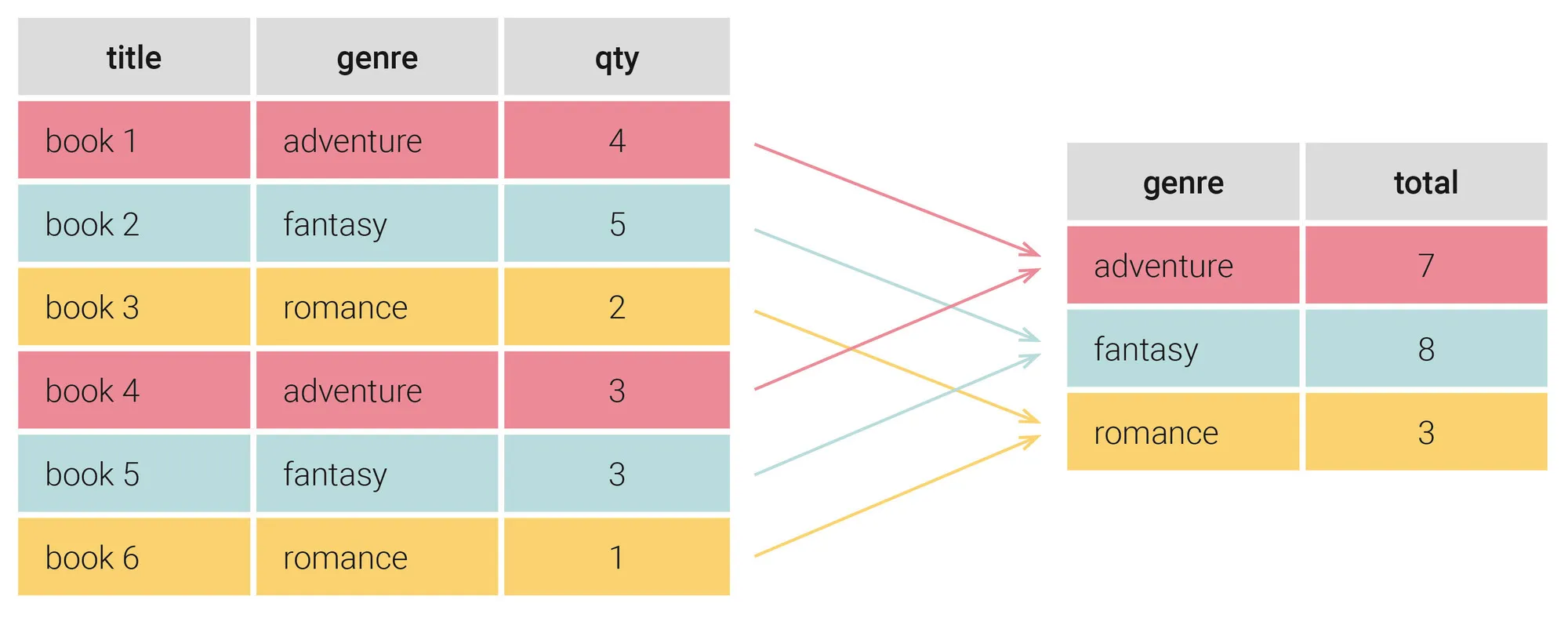
Suppose we’re running a bookstore and want to know how many books of different genres we have in stock. Our database includes a table that lists the books’ titles, genres, and stock quantity.
The visualization below shows how the GROUP BY clause creates groups from table data. We want to know the total quantity of books for each genre; thus, GROUP BY groups the books of the same genre and sums up the corresponding quantities. This creates a result table that lists genres and their total quantity of books in our stock.
Now it’s time for more specific examples of SQL queries with a GROUP BY clause.
We’ll use the book table, which stores the id, title, author, genre, language, price, and quantity of each novel we stock.
Example
(
id int unique not null,
title text not null,
author text not null,
genre text not null,
lang char(2) not null,
price numeric(5,2) not null check (price > 0),
qty int not null check (qty >= 0)
);
insert into book (id, title, author, genre, lang, price, qty) values
(1, 'Les Trois Mousquetaires', 'Alexandre Dumas', 'adventure', 'fr', 11.90, 4),
(2, 'A Game of Thrones', 'George R.R. Martin', 'fantasy', 'en', 8.49, 5),
(3, 'Pride and Prejudice', 'Jane Austen', 'romance', 'en', 9.99, 2),
(4, 'Vampire Academy', 'Richelle Mead', 'fantasy', 'en', 7.99, 3),
(5, 'Ivanhoe', 'Walter Scott', 'adventure', 'en', 9.99, 3),
(6, 'Armance', 'Stendhal', 'romance', 'fr', 5.88, 1);group by is used to bring together those rows in the table that have the same value in all the selected columns.
When you start building a query with group by, you can no longer use select * from table because you are creating a new table with the grouped rows.
And which values will be in the columns that are not grouped?
You can use aggregate functions to compute a single value for each group.
The most common aggregate functions is count which counts the number of rows in each group:
select genre, count(*)
from book
group by genre
Here, in the GROUP BY clause, we select our rows to be grouped by the column genre. Then the count(genre) function in the SELECT statement counts the number of rows within each group (i.e. each book genre), with the result displayed in the corresponding count(*) field:
| genre | count(*) |
|---|---|
| adventure | 2 |
| fantasy | 2 |
| romance | 2 |
Instead of counting the number of rows, you can also use other aggregate functions like sum to calculate the total number of books of each genre:
select genre, sum(qty) as total
from book
group by genre
Estàs llegint una vista prèvia.
Inicia sessió amb Google per llegir la pàgina completa. Un compte de Google inclou 5 pàgines gratuïtes en total; l'alumnat i el professorat llegeixen les pàgines del seu curs sense límit.
Inicia sessió