GPU
Introduction
IsardVDI allows working with Nvidia vWS technology, which allows you to have resources from a graphics card associated with a virtual desktop. This technology enables Isard to run software that requires dedicated GPU resources, such as 3D design programs, animation, video editing, CAD, or industrial design.
Profile
To be able to have this type of virtual machines, you must request àtom to activate the 4Q profile.
As a teacher, you can create a deployment for students with this profile, but in a deployment students cannot activate bastion.
xxx
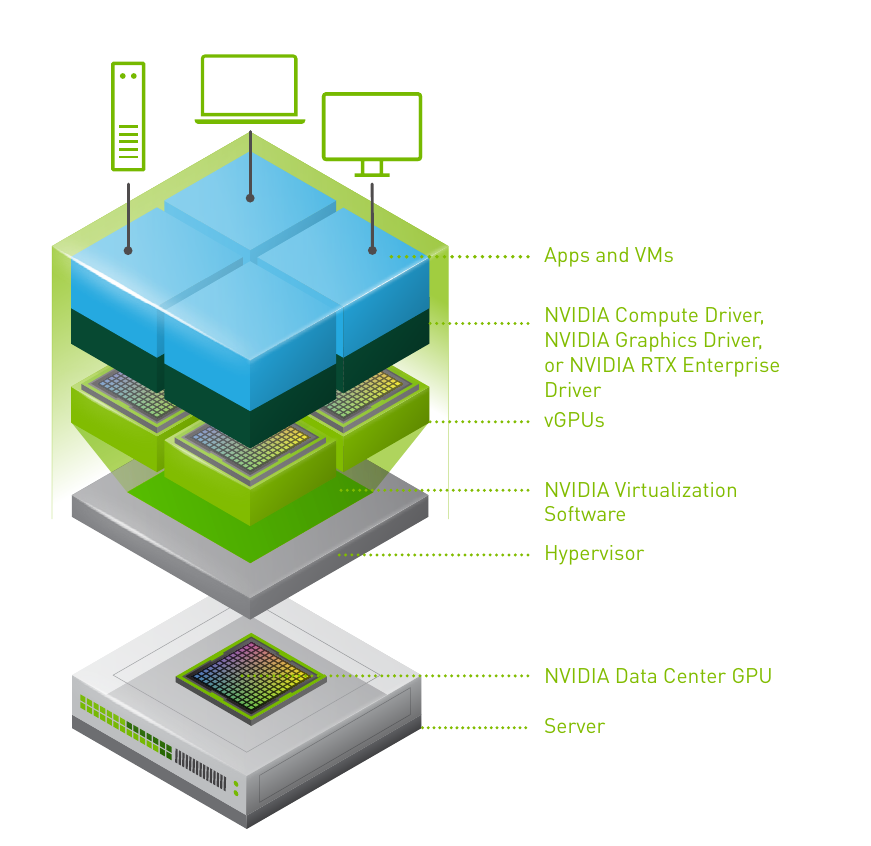
Each graphics card can be divided into different profiles with a certain amount of reserved memory. Depending on the selected profile, you will have more or fewer virtual cards. The following image shows a server with a series of GPU cards installed. Each card can be divided into vGPUs (virtual GPUs) that can be mapped to each virtual machine.
https://isard.gitlab.io/isardvdi-docs/user/gpu/
The version of the server’s host NVIDIA driver must be found out to install the same version on the virtual desktop so that there is compatibility between both machines.
| | NVIDIA-SMI 535.183.06 Driver Version: 535.183.06 CUDA Version: 12.2 |