MCP
MCP (Model Context Protocol) is an open-source standard for connecting AI applications to external systems.
Introduction
Using MCP, AI applications can connect to data sources (e.g., local files, databases), tools (e.g., search engines, calculators) and workflows (e.g., specialized prompts) — enabling them to access key information and perform tasks.
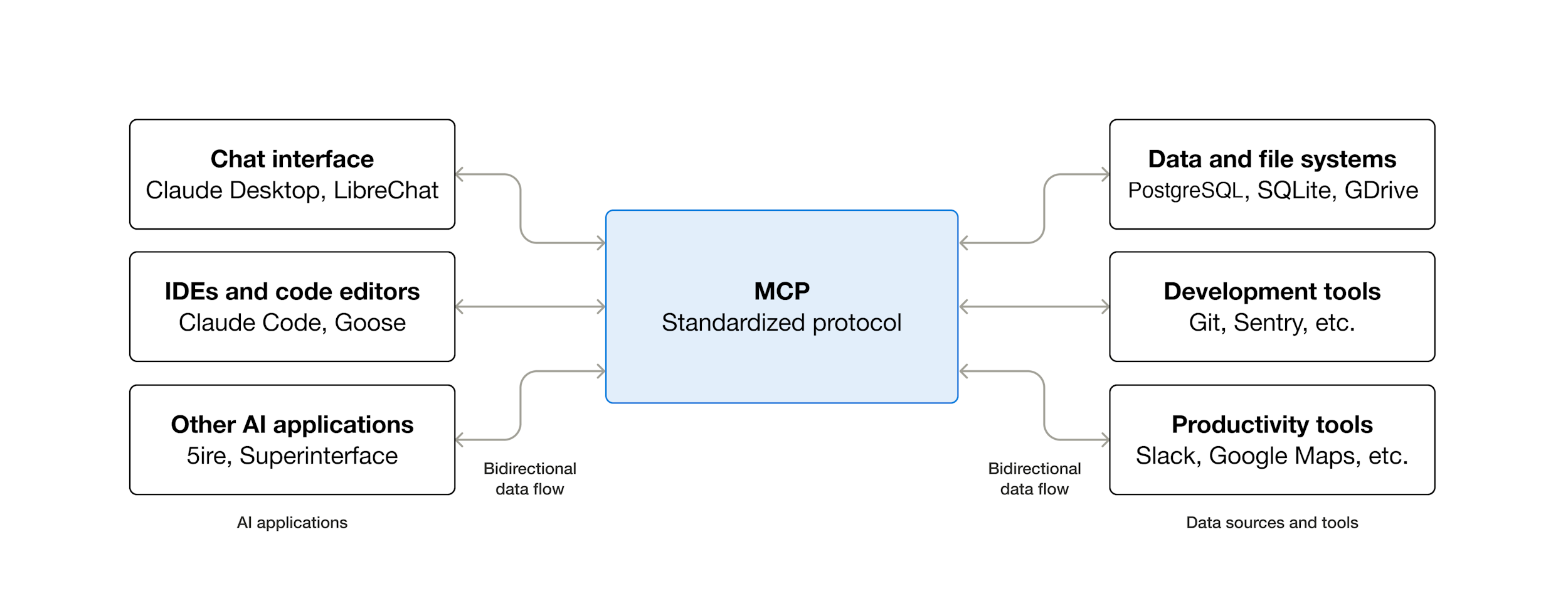
The November 25th spec release introduced many new features, including asynchronous operations, statelessness, server identity, and official extensions.
There are also official SDKs (Software Development Kits) for MCP in all major programming languages with 97M+ monthly SDK downloads across Python and TypeScript.
Depending on where you sit in the ecosystem, MCP can have a range of benefits.
-
Developers: MCP reduces development time and complexity when building, or integrating with, an AI application or agent.
-
AI applications or agents: MCP provides access to an ecosystem of data sources, tools, and apps which will enhance capabilities and improve the end-user experience.
-
End-users: MCP results in more capable AI applications or agents which can access your data and take actions on your behalf when necessary.
When you use an MCP server, it adds to the context. This can quickly add up if you have a lot of tools. So we recommend being careful with which MCP servers you use.
Certain MCP servers, like the GitHub MCP server, tend to add a lot of tokens and can easily exceed the context limit.
Install
Create a new project with Bun (select Blank template) and open it with OpenCode:
OpenCode uses a opencode.jsonc configuration file to manage MCP servers.
You can install MCP servers at the global level (for all projects) or at the project level.
Configuration File
To configure MCP servers globally, create or edit the file ~/.config/opencode/opencode.jsonc:
{
  "$schema": "https://opencode.ai/config.json",
  "mcp": {
    // Local MCP server: runs a command on your machine
    "sqlite": {
      "type": "local",
      "command": ["uvx", "mcp-server-sqlite", "--db-path", "~/my-database.sqlite"],
      "enabled": true
    },
    // Remote MCP server: connects to a URL
    "context7": {
      "type": "remote",
      "url": "https://mcp.context7.com/mcp",
      "enabled": true
    }
  }
}
Each MCP server needs:
- A unique name (e.g.,
"sqlite","context7") - A type:
"local"(runs a command) or"remote"(connects to a URL) - For local servers: a command array with the executable and arguments
- Optionally: environment variables, headers, or enabled flag
In this example we configured two MCP servers:
-
sqlite is a local server. It runs
mcp-server-sqliteon your machine, allowing OpenCode to query, insert, and modify data in a SQLite database using natural language. You can ask things like “show all students with a grade above 80” and OpenCode will translate that into SQL and execute it. -
context7 is a remote server. It connects to an external service that searches through library and framework documentation. When you are unsure how to use an API, you can add
use context7to your prompt and OpenCode will look up the relevant docs for you.
These two servers illustrate the two types of MCP integration: local servers run a process on your machine (useful for accessing local resources like databases or files), while remote servers connect to an external URL (useful for cloud services that require no local setup).
Project-Level Configuration
For project-specific servers, create opencode.jsonc in your project root:
{
  "$schema": "https://opencode.ai/config.json",
  "mcp": {
    "sqlite": {
      "type": "local",
      "command": ["uvx", "mcp-server-sqlite", "--db-path", "db.sqlite"],
      "enabled": true
    }
  }
}
Estás leyendo una vista previa.
Inicia sesión con Google para leer la página completa. Sigue el itinerario de aprendizaje — cada página se desbloquea cuando has leído las que la preceden. El alumnado y el profesorado leen las páginas de su curso sin límite.
Iniciar sesión