Motion
Introduction
We watch an ant make his laborious way across a wind- and wave-molded beach. He moves ahead, angles to the right to ease his climb up a steep dunelet, detours around a pebble, stops for a moment to exchange information with a compatriot. Thus he makes his weaving, halting way back home. … His horizons are very close, so that he deals with each obstacle as he comes to it; he probes for ways around or over it, without much thought for future obstacles. It is easy to trap him into deep detours.
Let’s pursue the point of view of turtle as mathematical “animal” by thinking of the turtle’s motion as a behavior pattern and the turtle programs as models of simple animal behavior.
Turtle geometry is particularly well suited to such modeling because of the local and intrinsic ways we specify the turtle’s movements.
Expressing motions in terms of forwards and rights is a much more direct way of dealing with an animal’s behavior than, say, describing movements in response to stimuli as changes in x and y coordinates.
Random Motion
Perhaps the simplest kind of motion to model with the turtle is random motion (repeatedly going forward and turning random amounts).
To implement this in a function, Python has a random-number generator random.uniform(low,high) that outputs a random number between low and high.
Using this we can write a function that takes four inputs specifying the ranges from which to select the inputs
to forward and left:
Even with this simple program, there is much to investigate.
How do the bounds on the forwards or the turns affect the path? For instance, unless you make a1 negative, the turtle will always turn left and the path will look roughly like a circle.
In fact, except when a1 is chosen to be the negative of a2, the turtle’s turning will be biased in one direction or the other and this will be reflected in the shape of the path.
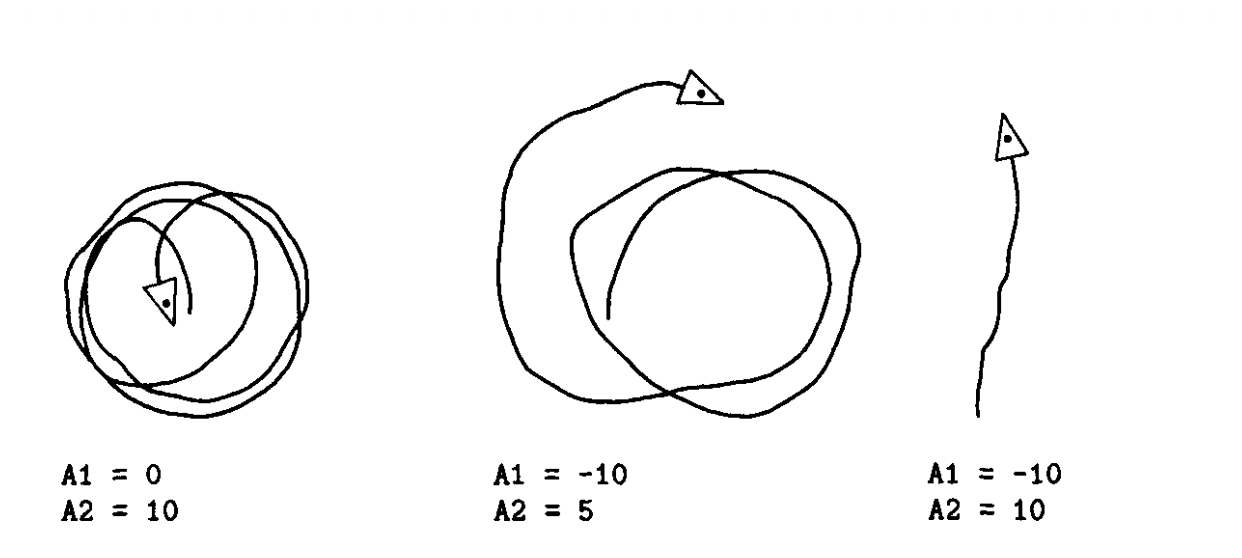
How about the case where the turning is unbiased? Would you expect the turtle to go off “to infinity”? Or will it instead travel in a very large circle? More generally, can you say anything about the radius of the “average path” as a function of the bounds on the turns?
One way to investigate these random motions is to write a record-keeping procedure that repeatedly runs, say, loo rounds of the random_move loop and automatically records such statistics as the turtle’s heading and distance from the origin after those 100 rounds.
Can you say anything about the average values of these quantities?
Box
Random-motion procedures such as this will often run the turtle off the edge of the display screen.
Forcing the turtle to stay on the screen suggests modifying the random motion to model the behavior of an animal crawling in a box.
To enable the turtle to do this, we implement the check_forward function, which is just like forward except that it won’t allow the turtle to move if the result takes it outside some fixed square box around the origin:
# Initializing global variables
= 200
"""
, and True.
, and False.
"""
# Save current position to restore it after boundary check
=
# Tentatively move forward to check if it would go out of bounds
= > or >
# Restore original position and state
return False
return True
"""
.
, :
, :
"""
"""
.
"""
This procedure makes use of some new functions in our turtle graphics system:
hideturtle()causes the turtle indicator not to be displayedshowturtle()restores the indicator;xcor()andycor()output, respectively, the x and y coordinates of the turtle;
We can use these procedures to model appropriate behaviors that will keep the turtle in the box.
Here, for example, is a version of random_move that has the turtle turn 180° whenever it runs into an
edge:
A second possibility for edge behavior is to have the turtle turn a little at a time, until it can go forward again.
This variation, incorporated into a random-motion procedure, causes the turtle to spend most of its time wandering along the edges of the box.
You may have observed the similar behavior of a real insect trapped in a box. Of course, with a real insect, this behavior is often interpreted as the insect trying to get out of the box by following the walls.
The turtle program calls into question the validity of such anthropomorphizing. If edge-following behavior can be produced by a simple combination of random motion plus wall avoidance, are we really justified in saying that the insect is “trying” to follow the edge? Could we legitimately make this claim about the turtle?
Perfecte — anem directes, clars i estructurats.
Collision-Based Interaction (Brief Introduction)
A collision occurs when two objects come close enough to touch or overlap.
In turtle simulations, we detect collisions by checking the distance between two objects and comparing it to a fixed threshold.
# collision detectedCollisions are:
- Binary (they either happen or they don’t)
- Event-based
- Triggered by contact or proximity
They allow objects to react when they meet.
Example 1: Two Squares Bouncing
In the first example:
- Two squares move toward each other.
- When their distance becomes smaller than a set value, a collision is detected.
- Their direction is reversed.
Here, the collision produces a physical response (bounce).
The rule is simple: detect → react → continue.
# Two squares moving in opposite directions and bouncing on collision
=
# Create square 1
=
# Move right
# Create square 2
=
# Move left
# Animation loop
# Check collision (distance threshold)
Example 2: Square and Circle with Text Trigger
In the second example:
- A square and a circle move toward each other.
- When they collide, movement stops.
- A message appears on the screen.
- Each message matches the color of its figure.
In this case, the collision acts as a logical trigger, not a physical bounce.
The objects interact only when they meet.
=
# Writer turtle (for text)
=
"""Crea un turtle amb la forma, color, posició i direcció especificades."""
=
return
"""Mostra una llista de missatges amb colors i posicions."""
= 100
-= 30
# Creem les dues figures
=
=
# Moviment fins a col·lisió
break # Stop after collision
From Collisions to Directed Motion
So far, interaction only happens at the moment of contact.
But in many biological systems, organisms react before touching something.
Instead of waiting for a collision, they respond to signals in their environment.
This leads us to directed motion.
Directed Motion: Modeling Smell
We can make our simulation more elaborate by allowing the turtle’s behavior to be affected by some stimulus.
For example, we could imagine that there is some food located in the box with the turtle and design mechanisms that allow the turtle to find the food “by sense of smell.”
There are many different ways we could provide turtles with information corresponding to an ability to smell.
- For example, the “amount of smell” could be a value that depends on how far the turtle is from the food (the larger the distance, the weaker the smell);
- or the turtle might not sense any particular level of smell, but at each move be able to detect whether the smell is getting stronger or weaker.
We’ll begin with the second possibility.
This “stronger-weaker” kind of smell can be modeled by managing smell values.
How can the turtle use this information to locate the food?
One possibility is this:
If the turtle finds that the smell is getting stronger, it keeps going in the same direction; otherwise it turns:
=
=
# Reached food
break